Affordable Group Buy Service
200+ Premium Tools Service
To import a Blocksy Starter Site, install the free Blocksy theme first, then add the separate Blocksy Companion plugin. The importer sits at Blocksy → Starter Sites. Blocksy recommends a fresh WordPress installation, or a complete backup if the site already has content. This guide covers the safe sequence and the checks to run before launch.
Key points
- Blocksy is a free WordPress theme; Blocksy Companion is a separate plugin.
- The basic theme works without Companion, but Starter Sites require Companion.
- The importer lets you choose a builder, plugins, a child theme, and which parts to import.
- Blocksy recommends a fresh site or a complete backup for an existing website.
- The BDSEOTOOLS listing states one-site activation and lifetime auto updates, but does not name Companion or a Pro license.
What are Blocksy and Blocksy Companion?
Blocksy is the theme you activate in WordPress. Blocksy Companion is a separate plugin that adds extra functionality, including access to the Starter Sites library. The official installation guide says Companion is not required for the basic theme to work, but Starter Sites are available through the Blocksy Dashboard after Companion is installed and activated.
Companion does not mean that every template or extension is included in every offer. The official Starter Sites directory marks some templates Pro. Check the specific design and its required plugins before you import it, and do not treat a Blocksy Theme listing as proof of a Blocksy Pro license.
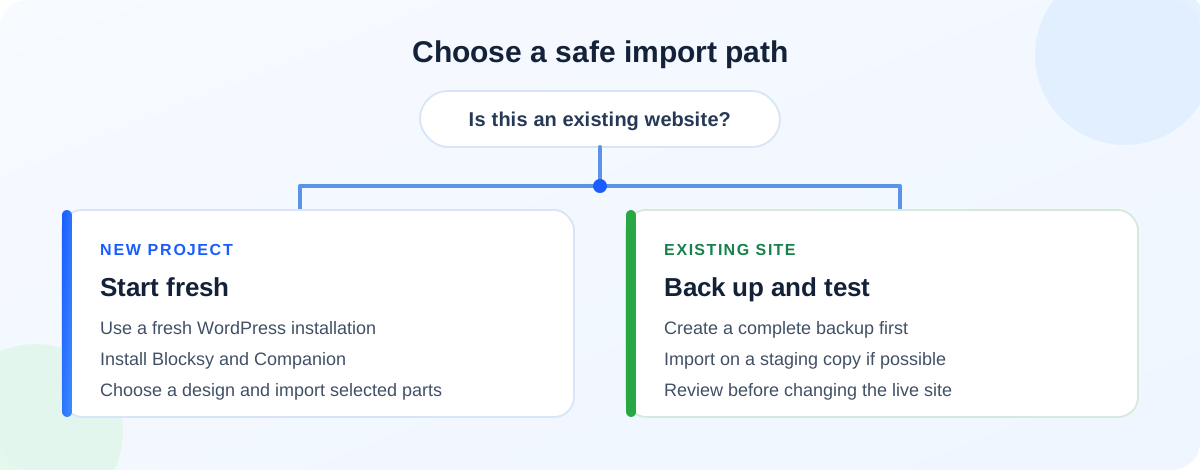
Before you import: fresh site, staging, or live?
- New website: Start with a fresh WordPress installation. This is Blocksy’s recommended setup for importing a Starter Site.
- Existing site with content: Make a complete backup first. If possible, import on a staging copy so the live site stays unchanged while you review the result.
- Choosing a template: Check which page builder and plugins it supports. Some Starter Sites offer more than one builder version.
- Checking access: Look for any Pro label and confirm that you have the required license or plugin access before starting.
How to install Blocksy and Companion
- In the WordPress dashboard, open Appearance → Themes.
- Select Add New, search for Blocksy, then choose Install and Activate.
- After activation, use the prompt to install the separate Blocksy Companion plugin. If you close the prompt, install Companion through Plugins → Add New Plugin.
- Activate Companion, then check that the Blocksy → Starter Sites section appears in the dashboard.
You can use the base Blocksy theme without Companion. Add Companion when you need Starter Sites or its other documented extensions.
How to import a Blocksy Starter Site
- Open Blocksy → Starter Sites and browse the designs.
- Open a design and review its supported builder and required plugins.
- Select Import to open the wizard. If the design has multiple builder versions, choose the one you plan to use.
- Decide whether the importer should create and activate a Blocksy child theme. Choose this based on your setup; do not assume the choice is required for every site.
- Review the required plugins and select only the ones you want to install.
- Choose which parts of the Starter Site to import, then start the import.
- Keep your backup or staging copy while you review the result. Do not replace the live site until the pages and settings are ready.
The import wizard provides choices for builder, plugins, child theme, and imported parts. Review each screen rather than accepting every option by default.
What should you check after import?
- Replace demo text, images, business details, and placeholder links with accurate material you can use.
- Review the homepage, menu, footer, and each imported page.
- Submit contact forms and test buttons, navigation, and important links.
- Check the layout on a phone as well as a desktop screen.
- Review any imported plugins and keep only the ones the site needs.
- Confirm that Pro-marked designs or extensions match the access you actually have.
If something looks wrong, use the staging copy or restore point to investigate. Do not keep making changes on a live site until you know which import or setting caused the issue.
Where BDSEOTOOLS fits
The BDSEOTOOLS Theme & Plugins listing currently shows Blocksy Theme at ৳499 for Lifetime, with one website activation using a license key and lifetime auto updates. Those are the terms stated for this catalog entry. It does not say that Blocksy Companion setup or a Blocksy Pro license is included. The base theme is also available from WordPress.org. Before paying, check the Theme & Plugins listing and contact BDSEOTOOLS to confirm what the offer adds and whether it covers the exact Companion or Pro access you need.
FAQ
Do I need Blocksy Companion to use Blocksy?
No. The base Blocksy theme can work without Companion. You do need the separate Companion plugin to open the Starter Sites library, according to Blocksy’s current documentation. Install it only when you need those additional features.
Should I import a Blocksy Starter Site on an existing website?
Blocksy recommends a fresh WordPress installation for a Starter Site. If you import on an existing site, create a complete backup first. A staging copy is a safer place to review the design before changing the live website.
Can I choose which parts of a Starter Site to import?
Yes. Blocksy’s current importer guide says the wizard lets you choose which parts to import, and it also presents builder, plugin, and child-theme options. Review those choices for the specific template because available options can differ between Starter Sites.
Does Blocksy Companion mean every Starter Site is included?
No. The official Starter Sites directory marks some templates Pro. Companion provides access to the Starter Sites area, but that does not prove every Pro template or extension is included in a separate theme offer.
Does the BDSEOTOOLS Blocksy listing include Blocksy Pro?
The current listing specifies one website activation with a license key and lifetime auto updates. It does not name Blocksy Pro or Companion setup. Ask BDSEOTOOLS to confirm the exact package before ordering if you need a Pro template or extension.
Sources
- Blocksy theme installation guide — theme and Companion roles; checked 19 November 2026.
- Blocksy Starter Site import guide — backup warning and importer choices; checked 19 November 2026.
- Blocksy on WordPress.org — free theme and optional commercial upgrades; checked 19 November 2026.
- Blocksy Companion on WordPress.org — official separate plugin; checked 19 November 2026.
- Official Blocksy Starter Sites directory — current template labels; checked 19 November 2026.